Printable Travel Document Checklist (Free PDF)

Sixteen documents with a tick box for having it, a box for having copied it, and a column for the date it stops being valid.
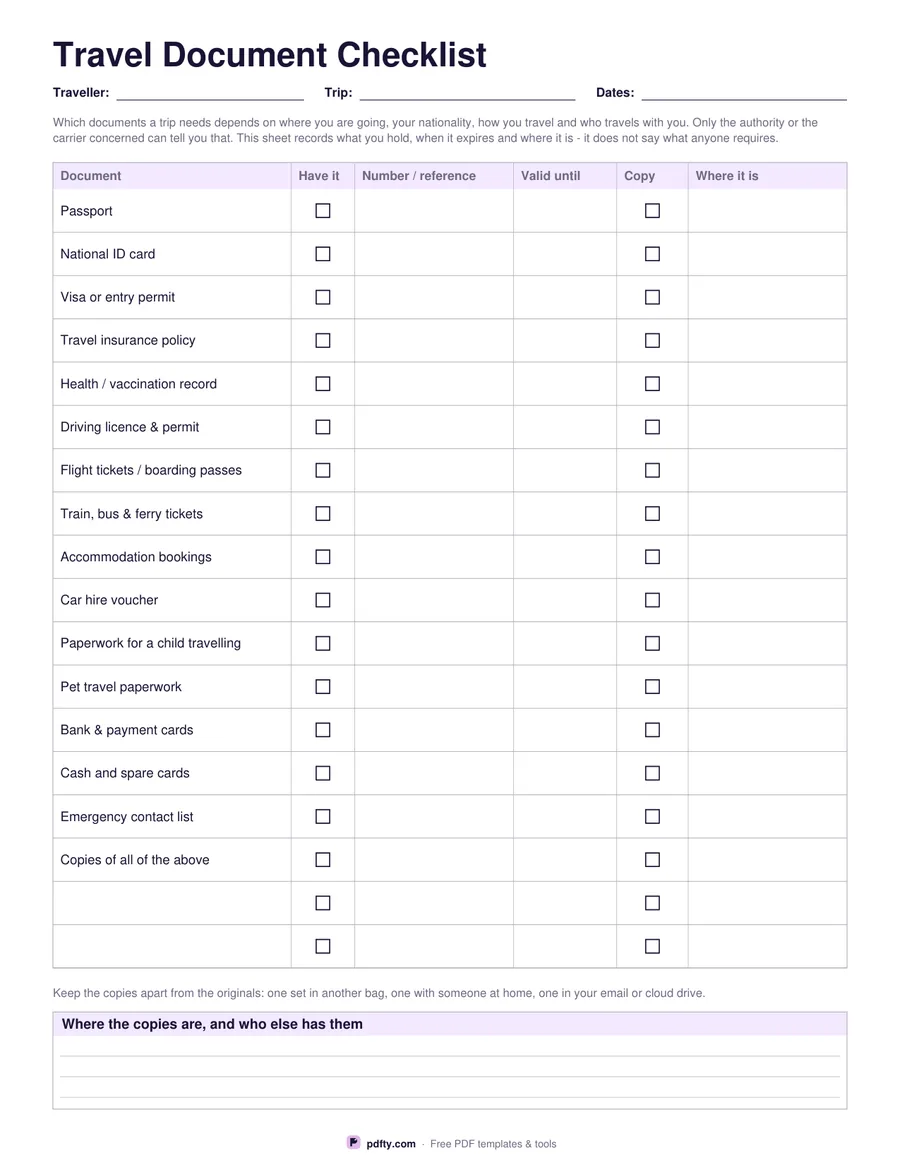
Printable travel document checklist with passport, visa, insurance and tickets rows and expiry date columns
Paper size
Fill & edit free online

Free · no watermark · no sign-up for your first 20 downloads a day

Fillable PDF — type into the fields online or in any PDF viewer before printing.

The printed rows cover passport, national ID card, visa or entry permit, travel insurance policy, health or vaccination record, driving licence and permit, flight tickets and boarding passes, train, bus and ferry tickets, accommodation bookings, car hire voucher, paperwork for a child travelling, pet travel paperwork, bank and payment cards, cash and spare cards, emergency contact list, and copies of all of the above. Two blank rows at the end take whatever your trip adds.

Five columns run across each row: a tick box for having it, the number or reference, the date it is valid until, a tick box for having made a copy, and where it is kept. The expiry column is the one that catches people out, because it is rarely the passport itself that has lapsed but the insurance, the licence or a permit nobody thought to look at.

What the sheet does not do is tell you what any destination requires. That depends on where you are going, your nationality, how you travel and who travels with you, and only the authority or the carrier concerned can answer it. A line under the table repeats the advice that matters either way: keep the copies apart from the originals — one set in another bag, one with someone at home, one in your email or cloud drive — and a ruled box records where yours are. One page, US Letter or A4.
How to use it

  1. 1

    Download the checklist

    Choose US Letter or A4 and download the one-page PDF.

  2. 2

    Check every expiry date

    Work down the rows writing the valid-until date for each document. Do this weeks before you travel, not the night before.

  3. 3

    Print or fill it in

    Print at 100% ("Actual size") so lines and boxes keep their exact spacing, or fill the form fields on screen in any PDF viewer.

  4. 4

    Copy, then separate

    Tick the copy column as you photograph or scan each document, and note in the box at the foot where the copies live and who else has them.

Frequently asked questions

Yes. There is no watermark and no sign-up for your first 20 downloads each day; after that a free account keeps downloads going. You may print the file as often as you like for personal, school or business use.
No. Entry requirements depend on your destination, your nationality, your route and who you travel with, and they change. Check with the authority or carrier concerned; this sheet records what you hold.
Sixteen printed documents and two blank rows, each with tick boxes for having it and having copied it, plus number, expiry and location columns.
Yes. Both tick columns, the reference, expiry and location cells, the two blank rows and the box at the foot are PDF form fields.
Having a document and having a copy of it are different states. The second box is what tells you, at a glance, how much of your paperwork would survive a lost bag.
Both works. Many people fill it in on screen, keep the file in cloud storage, and carry a printed copy in a different bag from the documents themselves.

More free templates

Work with your PDF