Employee Training Record (Free PDF)

One line per course, with the hours, the certificate number and the date the certificate stops being worth anything.
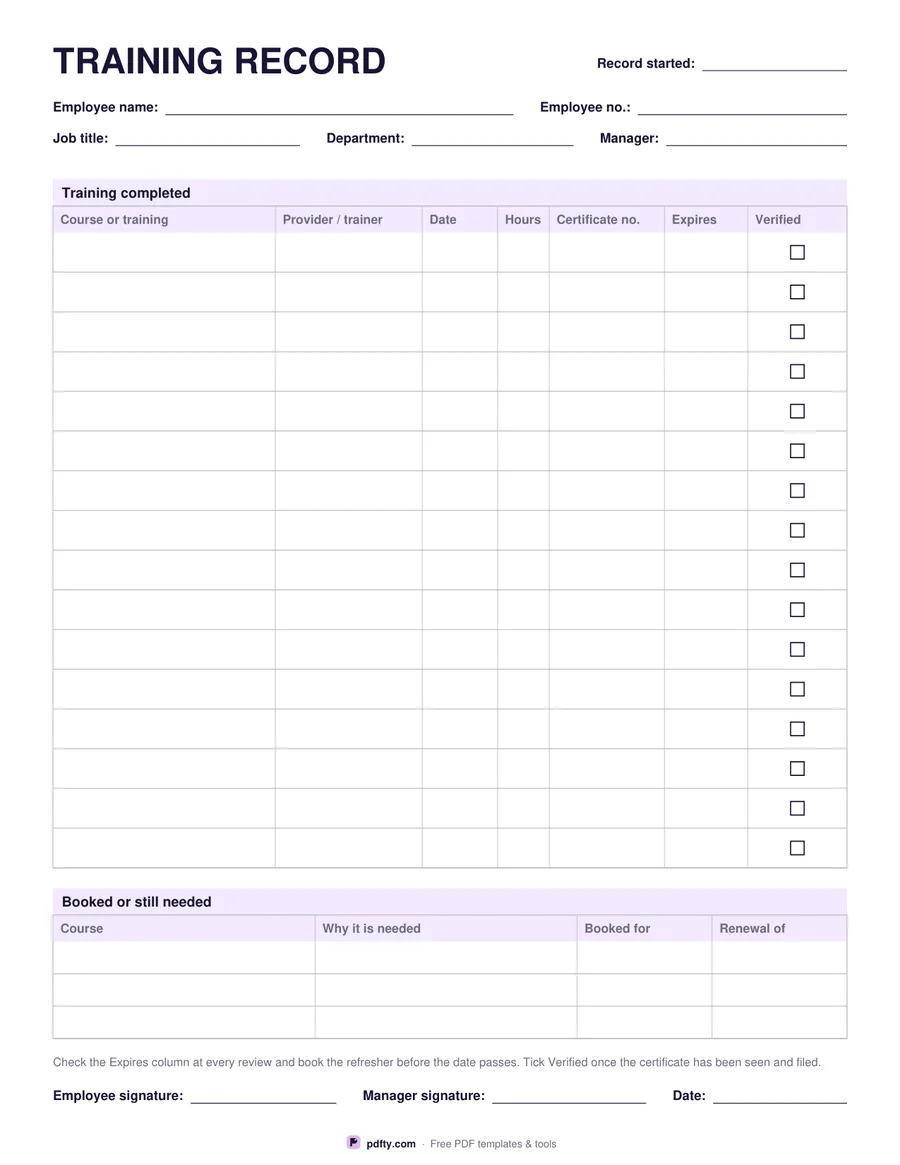
Printable employee training record with course, provider, hours and certificate expiry columns
Course rows
Paper size
Fill & edit free online

Free · no watermark · no sign-up for your first 20 downloads a day

Fillable PDF — type into the fields online or in any PDF viewer before printing.

A training record earns its keep on the expiry column. Each row takes the course or training, the provider or trainer, the date, the hours, the certificate number, the date it expires and a verified tick for when somebody has actually seen the certificate and filed it. Sixteen rows give generous writing room; twenty-two fit a longer career or a year of frequent refreshers. The header records the employee, employee number, job title, department, manager and the date the record was started.

Underneath the main table sits a short second one for training that is booked or still needed: the course, why it is needed, what it is booked for and which certificate it renews. That is the part most records miss, and it is the one that turns a backward-looking list into something a manager can act on at a review.

Nothing on the sheet assumes an industry or a country. Hours are hours, the certificate column suits a number, a licence or a pass, and the expiry column is simply a date you watch. It works equally for a first-aid certificate, a forklift licence, a food hygiene course, a software qualification or an internal induction. Both tables are fully fillable, and employee and manager signature lines close the page. One page, US Letter or A4.
How to use it

  1. 1

    Choose 16 or 22 rows

    Sixteen rows are roomier to write in; twenty-two cover a longer history on one sheet.

  2. 2

    Download the PDF

    US Letter or A4, free and without a watermark.

  3. 3

    Print or fill it in

    Print at 100% ("Actual size") so lines and boxes keep their exact spacing, or fill the form fields on screen in any PDF viewer.

  4. 4

    Watch the expiry column

    At every review, read down the expires column and book the refresher before the date passes. Tick verified only once the certificate has been seen.

Frequently asked questions

Yes. There is no watermark and no sign-up for your first 20 downloads each day; after that a free account keeps downloads going. You may print the file as often as you like for personal, school or business use.
Yes. Every cell in both tables, and the header fields, are form fields, so the record can be kept as a PDF per employee and updated as courses are completed.
Sixteen or twenty-two on the main table, plus three rows for training that is booked or still needed. Print a second copy and number the sheets when the first one fills.
No. The columns are generic - course, provider, date, hours, certificate number, expiry - so the same sheet suits a construction site, a clinic, a kitchen or an office.
It records that somebody has actually seen the certificate, not just been told about it. That is the difference between a training record and a list of claims.
Yes. The margins are equal on both sides, so a two-sided print gives you two sheets' worth of rows on one piece of paper.

More free templates

Work with your PDF