Printable Blood Sugar Log (Free PDF)

Twenty-six rows for your readings, with a tick for before or after a meal and a column for the insulin or medicine you took.
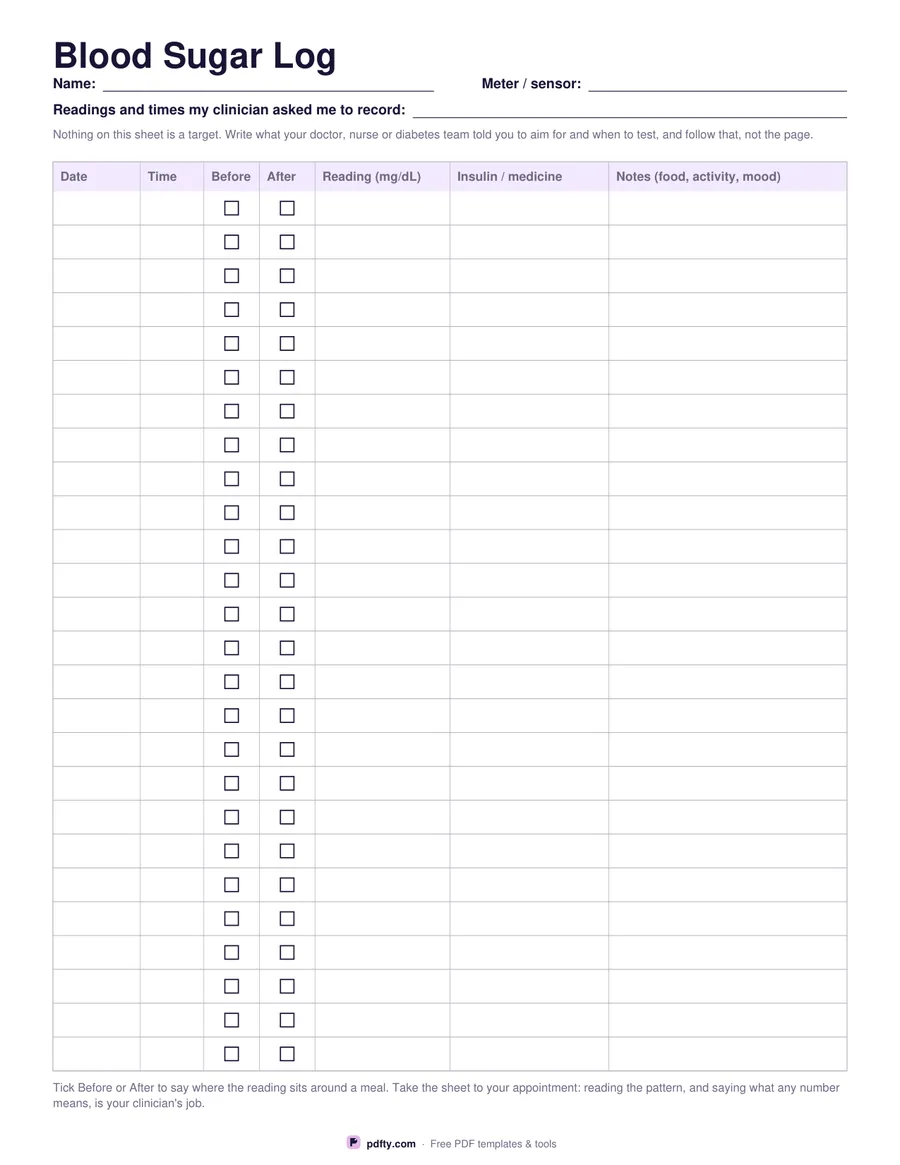
Printable blood sugar log with 26 rows for date, time, reading and medicine
Reading unit
Paper size
Fill & edit free online

Free · no watermark · no sign-up for your first 20 downloads a day

Fillable PDF — type into the fields online or in any PDF viewer before printing.

The table has twenty-six rows and seven columns: date, time, a Before tick, an After tick, the reading, the insulin or medicine you took, and a wide notes column for the meal, the walk or the illness that sits behind the number. Choose mg/dL or mmol/L before you download and the reading column header prints that unit, so nobody reading the sheet later has to guess which scale you were using.

Nothing on the page is a target. There is no printed range, no colour coding and no good-or-bad column, because the numbers to aim for depend on you, on your treatment and on your clinician. Instead the header has a line where you write the readings and times your diabetes team actually asked you to record, so the instruction travels with the log rather than living in your memory.

Every cell is a form field, so you can type the week up on a laptop and print a filled sheet, or print it blank and write at the kitchen table. It is one page in US Letter or A4, drawn as vector lines that stay crisp on any printer, with rows spaced for handwriting. Print a stack and keep them in a folder with your meter, and take the pages to your appointment: a written record over weeks shows a pattern that a meter's memory rarely makes obvious.
How to use it

  1. 1

    Pick your unit

    mg/dL or mmol/L — the reading column prints the one you choose.

  2. 2

    Write down the instructions

    Use the header line to copy the readings and times your clinician asked you to record.

  3. 3

    Print or fill it in

    Print at 100% ("Actual size") so lines and boxes keep their exact spacing, or fill the form fields on screen in any PDF viewer.

  4. 4

    Log each reading

    Tick Before or After to place the reading around a meal, and use the notes column for food, activity or illness.

Frequently asked questions

Yes. There is no watermark and no sign-up for your first 20 downloads each day; after that a free account keeps downloads going. You may print the file as often as you like for personal, school or business use.
Twenty-six rows. At four readings a day that is about a week to a page; at two a day it is nearly two weeks.
Because the right range is personal and is set by your doctor, nurse or diabetes team, not by a template. There is a header line for writing down what they told you instead.
Yes. The header lines and all the table cells are form fields, and Before and After are real checkboxes you can tick in any PDF viewer.
Yes. Choose two-sided printing in the print dialog and one sheet gives you two pages of the same layout. Nothing is printed upside down or mirrored, so both sides read the same way.
No. It is a blank sheet for recording what you measure or do, and it prints no targets, no normal ranges and no doses. What you write on it is for you and your doctor, nurse, therapist or pharmacist to read together.

More free templates

Work with your PDF