Printable Content Calendar (Free PDF)

A month of posts listed by publish date, with a column each for channel, topic, format, the hook and where the post has got to.
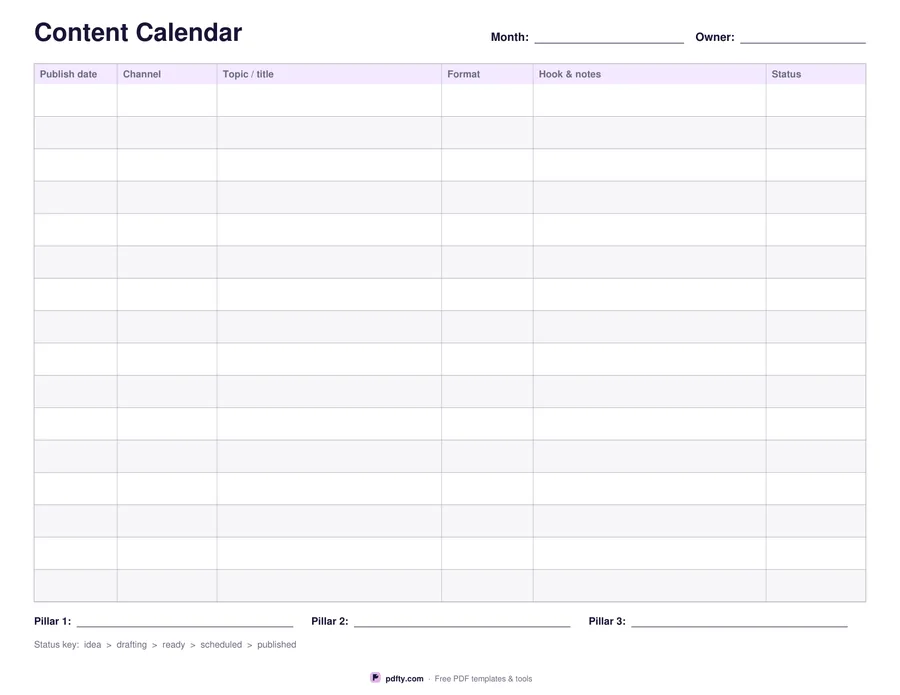
Printable content calendar with channel, topic, format, hook and status columns
Post rows
Paper size
Fill & edit free online

Free · no watermark · no sign-up for your first 20 downloads a day

Fillable PDF — type into the fields online or in any PDF viewer before printing.

This is the plain version of the spreadsheet most content plans start as: one row per post, ordered by the date it goes out. The columns are publish date, channel, topic or title, format, hook and notes, and status. Sixteen rows fit comfortably on a landscape page, and a twenty-four row version is there for a busier month. Alternating rows are tinted so a long line of entries stays readable across the width of the sheet.

The status column is the one that earns its place. A printed key along the bottom runs idea, drafting, ready, scheduled, published, so everyone writes the same five words and you can see at a glance how much of the month is actually finished. Below the table there are three lines for the content pillars you are working to that month, which is a quick check against drifting off-topic.

Month and owner lines sit at the top of the sheet. Every cell is a fillable form field, so a planning session can happen on screen and the finished month can then be printed for a wall or carried into a stand-up, or the sheet can be printed blank and filled in by hand while the meeting is running. Nothing on it is dated, so the same file works for any month of any year. It is one landscape page in US Letter or A4.
How to use it

  1. 1

    Choose how many rows

    Sixteen rows for a normal month, twenty-four if you post most days or run several channels.

  2. 2

    List the posts by date

    Fill in the publish date, channel, topic, format and hook for each one, then set the status from the key at the foot of the sheet.

  3. 3

    Print or fill it in

    Print at 100% ("Actual size") so lines and boxes keep their exact spacing, or fill the form fields on screen in any PDF viewer.

  4. 4

    Update the status column

    Move each row along the key as it is written, approved and scheduled, and print a fresh sheet each month.

Frequently asked questions

Yes. There is no watermark and no sign-up for your first 20 downloads each day; after that a free account keeps downloads going. You may print the file as often as you like for personal, school or business use.
Sixteen on the standard version and twenty-four on the long one. For a heavier month, print two sheets and split them by channel.
One of the five words printed in the key at the bottom: idea, drafting, ready, scheduled or published. Using the same five keeps the sheet readable by everybody.
Yes. Every cell is a form field, plus the month and owner lines and the three content pillar lines underneath the table.
No. The channel column is a blank cell, so the same sheet covers a blog, a newsletter, YouTube, a podcast or any mix of them.
Yes. Open the PDF in an annotation app such as GoodNotes, Notability or Xodo and write on it with a stylus, or fill the form fields in any PDF reader and keep the file on screen.

More free templates

Work with your PDF