Crochet Project Planner (Free Printable PDF)

Pattern, yarn, hook size and gauge at the top, then a round-by-round stitch count table so you can check your increases without unravelling anything.
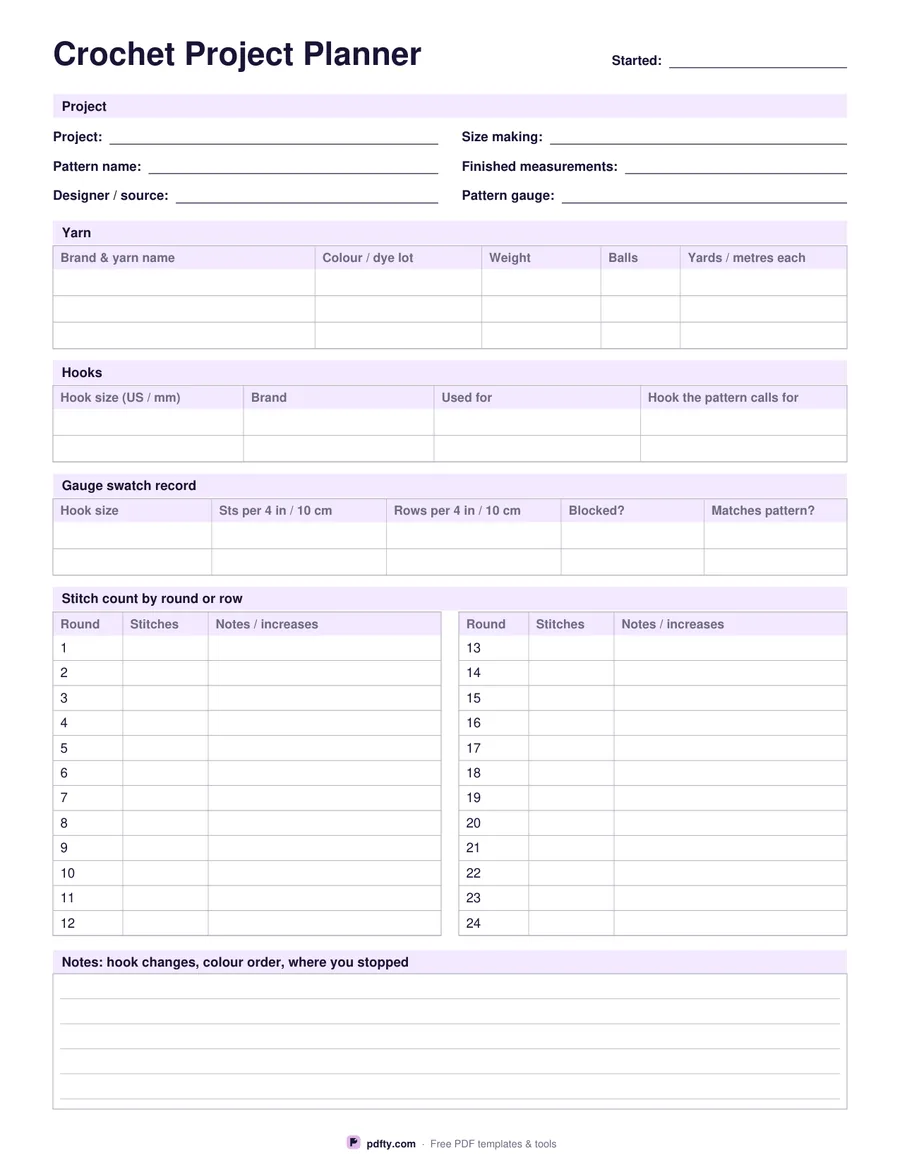
Printable crochet project planner with yarn and hook tables and a stitch count table
Stitch count rows
Paper size
Fill & edit free online

Free · no watermark · no sign-up for your first 20 downloads a day

Fillable PDF — type into the fields online or in any PDF viewer before printing.

The top of the sheet holds the project, the pattern name, the designer or source, the size you are making, the finished measurements and the gauge the pattern asks for. The yarn table takes three yarns with brand, colourway and dye lot, weight, number of balls and the yardage or metres in each ball, so a mid-project trip to the shop starts with the right information rather than a guess.

The hook table records two hooks by US letter and millimetre size, brand, what you used each for, and the hook the pattern called for, which is the quickest way to see why your gauge came out tight. Underneath, the gauge swatch record keeps two attempts: hook size, stitches and rows over four inches or ten centimetres, whether you blocked the swatch and whether it matched.

The stitch count table is the part a crochet pattern really needs. Rounds are already numbered down two columns, 12 or 24 of them depending on the option, with a column for the stitch count at the end of the round and a wider column for increases, decreases and colour changes. If a later round goes wrong, the count tells you which round it happened in. A ruled notes block closes the page, and every cell is fillable.
How to use it

  1. 1

    Pick how many rounds you need

    12 rounds fit an amigurumi part or a granny square; 24 fit a hat, a bag or a shawl section.

  2. 2

    Write down the yarn and hook

    Fill the yarn and hook tables on screen or by hand, including the hook the pattern specifies.

  3. 3

    Print or fill it in

    Print at 100% ("Actual size") so lines and boxes keep their exact spacing, or fill the form fields on screen in any PDF viewer.

  4. 4

    Log the stitch count each round

    At the end of every round, write the number of stitches you have. It is the fastest way to catch a missed increase.

Frequently asked questions

Yes. There is no watermark and no sign-up for your first 20 downloads each day; after that a free account keeps downloads going. You may print the file as often as you like for personal, school or business use.
Yes. Every box and line on the sheet is a PDF form field, so you can fill it in Adobe Reader, Preview, Chrome or Edge and print a tidy copy, or print it blank and write by hand.
Yes. The column is headed Round, but nothing stops you using it for rows worked flat; the stitch count matters either way.
12 or 24, numbered for you in two columns, with a stitch count column and a wider notes column for increases and colour changes.
Three yarns and two hooks, which covers most projects that use a main and a contrast colour.
Yes. Open the PDF in an annotation app such as GoodNotes, Notability or Xodo and write on it with a stylus, or fill the form fields and keep the file with your other project notes.

More free templates

Work with your PDF