Printable Hotel Comparison Chart (Free PDF)

Three or four places side by side on seventeen rows, so the choice comes down to a table instead of fifteen open browser tabs.
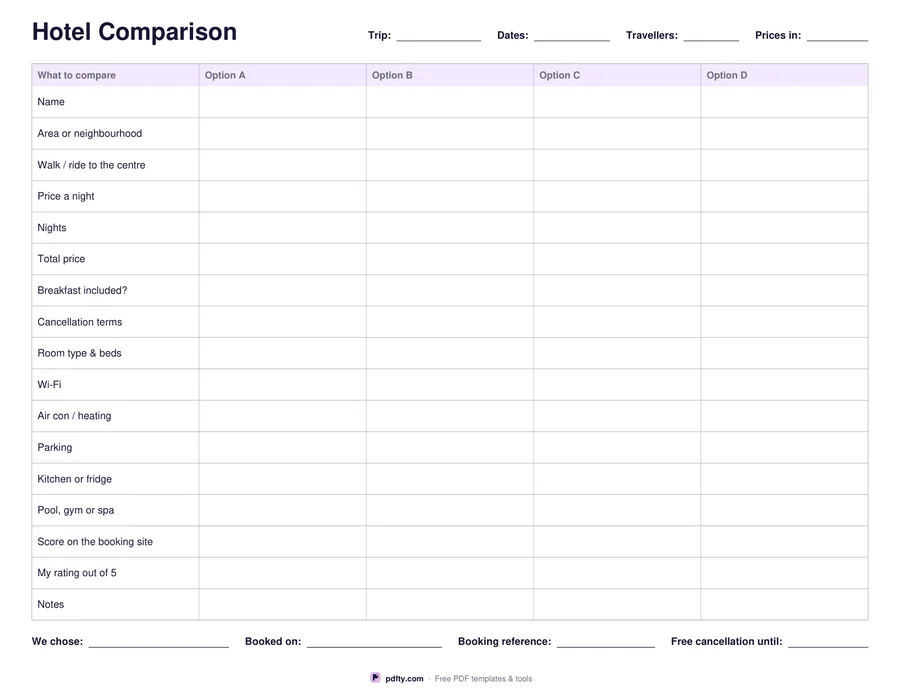
Printable hotel comparison chart with price, location, breakfast, cancellation and rating rows across four options
Options
Paper size
Fill & edit free online

Free · no watermark · no sign-up for your first 20 downloads a day

Fillable PDF — type into the fields online or in any PDF viewer before printing.

The rows are what actually decides it: name, area or neighbourhood, how far it is to the centre on foot or by transport, price a night, number of nights, total price, whether breakfast is included, the cancellation terms, room type and beds, Wi-Fi, air conditioning or heating, parking, kitchen or fridge, pool, gym or spa, the score on the booking site, your own rating out of five, and a notes row.

Two of those rows are the ones people skip and regret. Total price, because a cheaper nightly rate over more nights with a resort fee is not cheaper. And cancellation terms, because the difference between free cancellation and non-refundable is worth writing down next to the price rather than discovering later. Your own rating out of five sits below the site's score on purpose: they are rarely the same number.

Choose three or four options before you download. A decision line runs along the foot — what you chose, when you booked it, the booking reference and the date free cancellation runs out — so the sheet is still useful after the choice is made. Prices are written in a currency you name at the top; no symbols are printed. Every cell is a form field. One landscape page, US Letter or A4.
How to use it

  1. 1

    Pick three or four options

    Three gives wider columns for long names and notes; four fits one more candidate. Then choose US Letter or A4.

  2. 2

    Fill one column per place

    Work down the seventeen rows for each option, copying price a night, total, breakfast and cancellation terms from the booking page.

  3. 3

    Print or fill it in

    Print at 100% ("Actual size") so lines and boxes keep their exact spacing, or fill the form fields on screen in any PDF viewer.

  4. 4

    Score it and decide

    Give each place your own rating out of five, then write the choice, the date, the reference and the free-cancellation date on the line at the foot.

Frequently asked questions

Yes. There is no watermark and no sign-up for your first 20 downloads each day; after that a free account keeps downloads going. You may print the file as often as you like for personal, school or business use.
Seventeen rows: name, area, distance to the centre, price a night, nights, total price, breakfast, cancellation terms, room type and beds, Wi-Fi, air con or heating, parking, kitchen or fridge, pool or gym, the site's score, your rating out of five, and notes.
Both versions exist — choose before you download. Three gives noticeably wider columns, which helps if hotel names and cancellation terms are long.
Yes. Every cell, the trip and currency lines at the top and the decision line at the foot are PDF form fields.
Yes. The rows are generic enough for any stay, and the kitchen or fridge row is often the deciding one for an apartment.
Yours. There is a "Prices in" field at the top and no currency symbol anywhere on the sheet.

More free templates

Work with your PDF