Printable Moving Box Labels (Free PDF)

Six or four labels to a page, each with a big box number, the room it is going to, contents lines and fragile and open-first ticks.
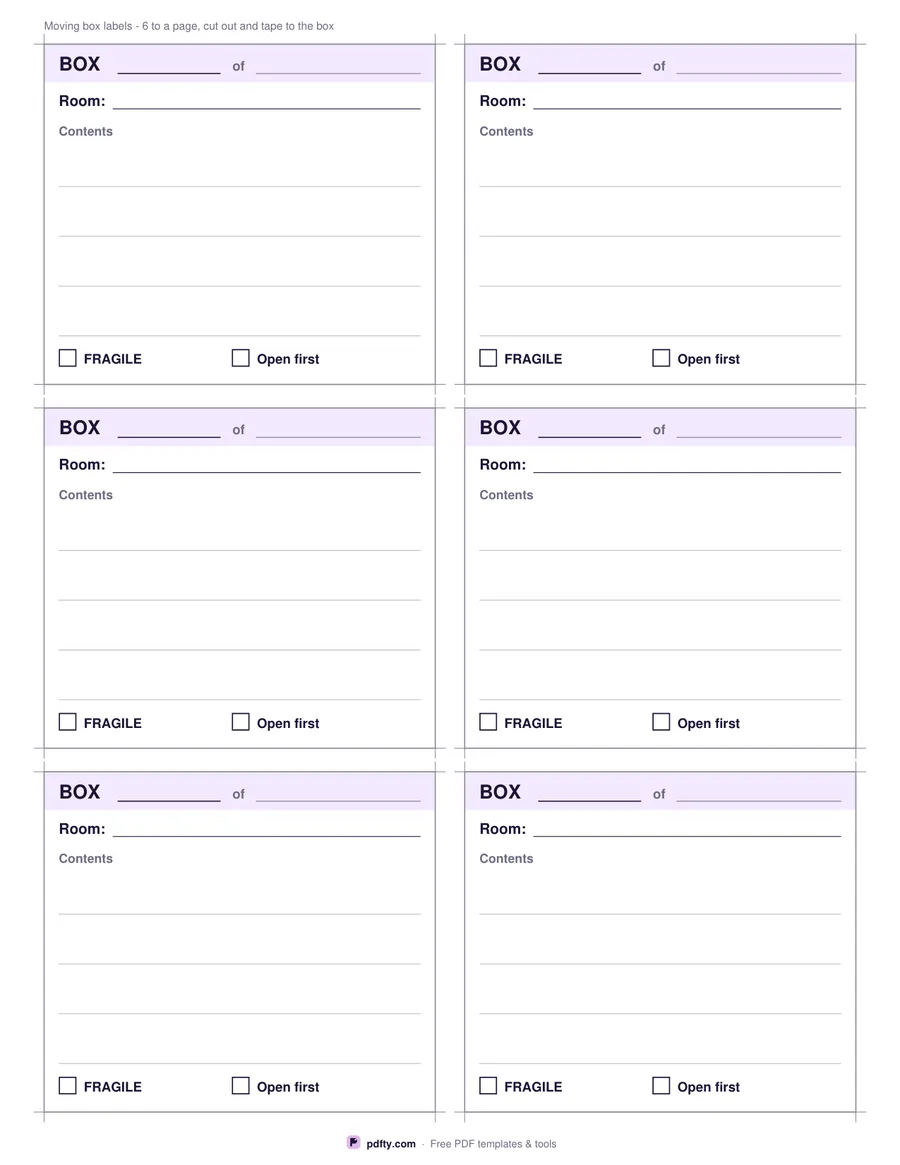
Printable moving box labels with room, contents and a fragile tick
Labels per page
Paper size
Fill & edit free online

Free · no watermark · no sign-up for your first 20 downloads a day

Fillable PDF — type into the fields online or in any PDF viewer before printing.

Each label is headed BOX, with a large number field and an of field next to it, so box 7 of 34 is readable from across a room. Under that is the room the box is going to — written for the new house, not the old one, which is the single thing that saves the most carrying on moving day.

Then come the contents lines, four on the six-per-page layout and seven on the larger four-per-page one, and two tick boxes at the foot: FRAGILE, and Open first, for the kettle, the chargers, the bedding and the box that makes the first night survivable. Corner marks show where to cut, and the contents lines are worth filling in properly, because the alternative on the far side of a move is opening nine boxes to find the tin opener.

Every field is fillable, so you can number a whole set on screen before printing, which beats writing thirty numbers by hand and discovering two of them are 14. Print on ordinary paper and tape them on, or use sticky label paper if you have it; put the label on the side of the box rather than the top, so it can still be read when boxes are stacked. Six or four labels per page, US Letter or A4, printed as many times as your move needs.
How to use it

  1. 1

    Choose six or four per page

    Six smaller labels with four contents lines, or four larger ones with seven.

  2. 2

    Number them on screen

    Fill the box number, room and contents in a PDF viewer, or print blank and write by hand.

  3. 3

    Print or fill it in

    Print at 100% ("Actual size") so lines and boxes keep their exact spacing, or fill the form fields on screen in any PDF viewer.

  4. 4

    Cut and tape them on

    Cut along the corner marks and tape each label to the side of its box, not the top.

Frequently asked questions

Yes. There is no watermark and no sign-up for your first 20 downloads each day; after that a free account keeps downloads going. You may print the file as often as you like for personal, school or business use.
Six or four per page. Print the page as many times as you need — most moves run to several dozen boxes.
Yes. The box number, the of field, the room, every contents line and both tick boxes are form fields.
They are laid out for plain paper with cut marks rather than for a particular label sheet, so print on paper and tape them on, or print on full-sheet adhesive paper and cut them out.
No. Ordinary paper is fine and card stock holds up better if the cards will be handled a lot. Print at 100% so the cut marks land where they should.
That is for you, but kettle, mugs, chargers, bedding, toilet roll and a knife covers most first evenings.

More free templates

Work with your PDF