Supplier Evaluation Form (Free PDF)

Score a supplier on the things that actually matter to you, weight them, and end up with one number you can defend.
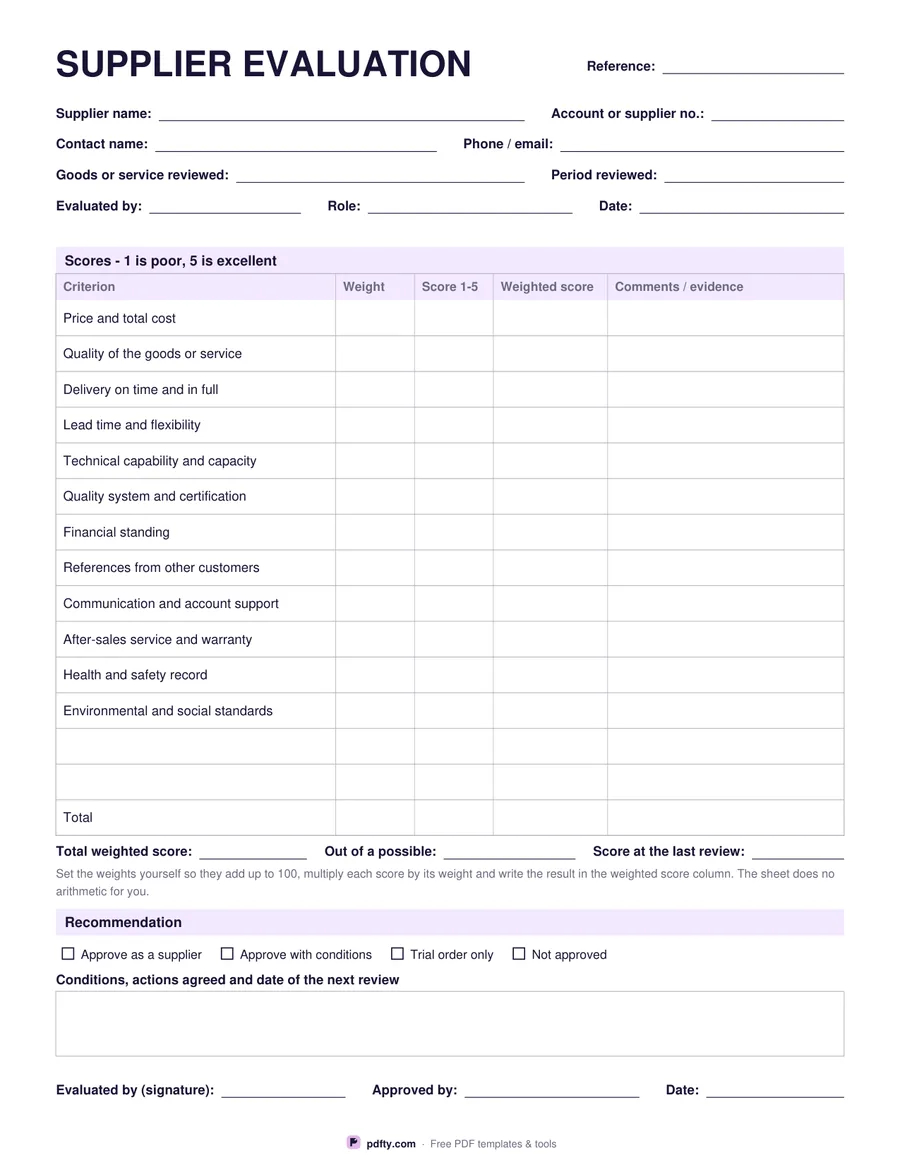
Printable supplier evaluation form with weighted criteria, scores and a recommendation
Criteria
Paper size
Fill & edit free online

Free · no watermark · no sign-up for your first 20 downloads a day

Fillable PDF — type into the fields online or in any PDF viewer before printing.

This is a scoring sheet rather than a questionnaire. The header records the supplier, the account number, the contact, what is being bought, the period under review and who is doing the evaluating. Below it the scoring table gives every criterion four columns: a weight, a score from 1 to 5, the weighted score and a comments column for the evidence behind the number. A total row closes the table, and three fields underneath take the total weighted score, the maximum possible and the score at the last review.

The printed version lists twelve criteria to start from: price and total cost, quality, delivery on time and in full, lead time and flexibility, technical capability, quality systems and certification, financial standing, references, communication and account support, after-sales and warranty, health and safety, and environmental and social standards. Two blank rows let you add your own. The blank version drops the printed list and gives you fifteen empty rows instead, for a trade where the criteria are nothing like that list.

Weights are deliberately left empty. Nothing is printed as a rule: you decide what matters and set weights that add up to a hundred, which is the part of a supplier review that gets argued about and should. The sheet ends with a recommendation - approve, approve with conditions, trial order only, or not approved - a box for the conditions and the date of the next review, and two signature lines. One page, US Letter or A4, every cell fillable.
How to use it

  1. 1

    Pick printed or blank criteria

    The printed sheet starts you off with twelve common criteria; the blank one gives fifteen empty rows.

  2. 2

    Download and set your weights

    Decide what matters most and write weights that add up to 100 before you score anything.

  3. 3

    Print or fill it in

    Print at 100% ("Actual size") so lines and boxes keep their exact spacing, or fill the form fields on screen in any PDF viewer.

  4. 4

    Score, total and recommend

    Score each criterion 1 to 5, multiply by the weight, total the column and tick a recommendation.

Frequently asked questions

Yes. There is no watermark and no sign-up for your first 20 downloads each day; after that a free account keeps downloads going. You may print the file as often as you like for personal, school or business use.
Because no two buyers weigh a supplier the same way. A contractor may put delivery above price; a laboratory may put certification above both. The sheet gives you the column and leaves the judgement to you.
No. The cells are plain text fields with no formulas, so the file opens correctly in every PDF app. Multiply the score by the weight yourself and write the result in.
Yes. Every cell, including the comments column and the conditions box, is a form field, so a whole evaluation can be filed as a PDF.
Fourteen rows plus a total on the printed version, twelve of them already filled in, or fifteen blank rows plus a total on the other.
Yes. There is a field for the score at the last review, so this year's number sits next to last year's, and the conditions box has room for the date of the next one.

More free templates

Work with your PDF